
Card Verification Holds: What Happens at Free Page Signup
A free OnlyFans page still asks for a card before it unlocks, and that request is usually a $0.10 verification hold rather than a charge. The hold confirms your payment method is valid, then disappears within days. This guide explains why zero-dollar subscriptions trigger card checks, how the pending amount looks on your statement, and what to do when the hold lingers. BestOnlyFans tracks how these signup flows behave across free pages so subscribers know what to expect before typing card details.
Card verification exists because a free subscription is not a billing-free account. The platform collects a payment method once, then reuses it for pay-per-view unlocks, tips, and any future paid subscription you choose. The $0.10 amount is an authorization test, not revenue. It also proves the cardholder is an adult, which matters for compliance on adult platforms.

Why Free Pages Require Payment Methods at All
Free pages set the subscription price to $0 and earn through pay-per-view messages and tips instead. That model only works if every follower already has a working card attached. Otherwise the first paid message would stall at checkout, and creators would lose the sale. BestOnlyFans refreshes its rankings every month.
- Age verification compliance for adult content access
- Pay-per-view purchase infrastructure ready at the moment of unlock
- Tip functionality prepared without a second signup step
- Potential future paid subscription conversion without re-entry of card data
- Fraud prevention through a validated payment instrument
Consider the alternative. If free pages accepted anyone with an email address, the platform would carry the cost of processing countless failed transactions later. Card collection up front filters out payment methods that would decline during an actual purchase.
There is also a practical conversion argument. When a subscriber has already stored a card, unlocking a $10 pay-per-view message takes one tap. The friction of a fresh checkout is removed, and creators earn more from the same audience.

The $0.10 Verification Hold: Mechanics and Timeline
When you add a card, the platform sends a small authorization request to your bank. Your bank places a temporary hold for $0.10 and reports it as pending. The platform never captures that amount; it waits to see whether the authorization succeeds.
| Stage | Card Status | Subscriber Sees |
|---|---|---|
| Authorization request sent | Card validated | Signup completes, no charge yet |
| Pending hold appears | Funds reserved | $0.10 pending in banking app |
| Merchant capture window | Held, not charged | Amount stays pending |
| Automatic release | Hold removed | Pending line disappears |
| Refund posting | Balance restored | Statement shows no final charge |
Refund timing runs within days for most banks, though some issuers hold authorizations longer. A card issuer determines how fast the pending line clears, not the platform. If your bank posts authorizations slowly, the $0.10 may sit visible for up to a week.
A $0.10 line that stays pending is normal, but a posted charge of $0.10 is not. If your statement shows the amount as completed rather than pending, contact support and keep the timestamp.

Reading Your Statement: What OnlyFans Charges Look Like
Statement descriptors cause most of the confusion around free page signups. A pending authorization may appear under a processor name rather than the platform brand. Subscribers often mistake that line for a subscription they never bought. The descriptor also varies by region and card network. Some banks display a shortened merchant name; others show a generic payment processor.
Neither means your account was charged for something you did not authorize. The reliable check is the amount and status. A $0.10 pending line matches the verification hold. A posted charge of $4.99 or more means a real subscription started. Paid subscriptions run from $4.99 at minimum to $49.99 at maximum, with most pages clustering around $5 to $10.
Promotional first months can dip below $4.99, such as a $3 first month, but base prices cannot. If a creator raises their price, auto-renew stops automatically and your existing access lasts until the paid period ends. That rule matters when you are reviewing statements after a price change notification.
Prepaid and Virtual Card Compatibility for Free Signups
Not every card type clears verification. Prepaid cards from major networks often work, but some reject small authorization requests or block adult merchants entirely. Virtual cards issued by your bank tend to behave like the underlying debit or credit card.
- Major network prepaid cards: frequently accepted, but merchant category blocks can cause declines
- Bank-issued virtual cards: usually reliable, with disposable numbers you can freeze afterward
- Digital wallet tokens: work when the underlying card supports online adult transactions
- Gift cards: rarely viable because they lack a billing address and name match
- International cards: accepted, though currency conversion and issuer rules may delay the hold release
Virtual cards carry a privacy advantage. You can set a low spending limit, then freeze the number after verification. A dedicated card for subscriptions also makes monthly statement review faster.

Security Protocols During Payment Entry
Payment entry is the point where phishing attempts concentrate. Fake pages imitate free subscription offers and ask for card data on domains that are not the real platform. A few checks separate a legitimate flow from a scam.
- Confirm HTTPS in the address bar before typing anything
- Verify the domain reads onlyfans.com with no extra words or hyphens
- Refuse any third-party redirect that asks for card details
- Use your phone’s secure element or saved wallet rather than manual entry when possible
- Never open payment links sent by SMS from unknown numbers
Legitimate entry flows never ask for your bank login. They ask for a card number, expiry, and security code, nothing more. Requests for online banking credentials match recognized patterns of phishing, and that pattern should end the transaction immediately.
Two-factor authentication on your account adds a second layer. Even if someone obtains your login, they cannot reach billing settings without the second factor. Enable it before you add any card.
From Verification to First PPV: The Spending Onset
Verification is designed to be frictionless because the next step is spending. Once your card clears, browsing begins immediately and the first paid unlock is one tap away. That transition is where monthly costs accumulate faster than subscribers expect.
| Timeframe | Typical Action | Cost Implication |
|---|---|---|
| First minutes | Browsing free posts | No cost |
| First day | Unlocking a PPV message | Up to $50 per unlock |
| First week | Responding to tips or paid chat | $3-$5 per message, tips to $100 |
| First month | Considering bundle offers | Cumulative spend above entry cost |
| Ongoing | Adding more free pages | New cards, new verification holds |
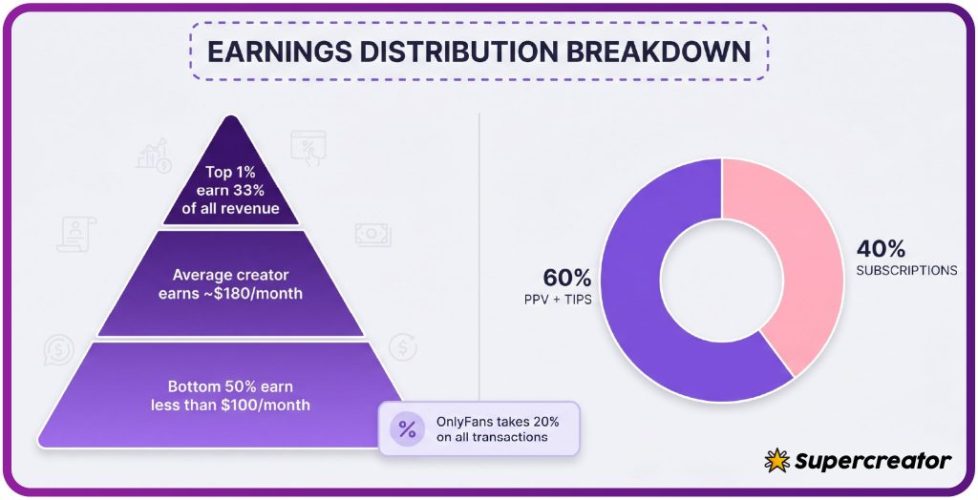
The platform fee structure shapes creator behavior here. Creators keep 80% and the platform takes 20% on everything, so paid messages and tips carry real margin. That is why free pages push paid chat and unlock offers rather than ad revenue.
There is no built-in discovery feed or directory, which is why ranking sites exist in the first place. Subscribers find pages through external lists, social posts, and word of mouth rather than an in-platform search. Our own ranking work uses the BestOnlyFans methodology to compare pages on pricing transparency, posting consistency, and how clearly they label paid content before an unlock.
Managing Multiple Free Page Verifications
Each free page you follow with a new card can generate its own $0.10 hold. Three signups in a week may produce three pending lines, which looks alarming until you match the timestamps. Tracking prevents that confusion.
- Use one dedicated card for all OnlyFans activity so every line is easy to identify
- Note the date of each signup in a calendar or notes app
- Review statements weekly rather than monthly to catch pending lines early
- Cross-reference the ranking card before following a new page so you avoid duplicates
- Unsubscribe from promotional emails to reduce exposure to fake offers
Subscribers seeking free access to international pages sometimes search for terms like free onlyfans iceland, and those searches often lead to third-party sites of varying quality. A page that demands card data outside the platform’s own checkout is a red flag regardless of how the offer is framed.

Dispute Pathways When Verification Holds Don’t Release
Most holds clear without intervention. When one persists, work through the steps in order rather than jumping straight to a chargeback, which can close your account.
- Check whether the $0.10 is pending or posted in your banking app
- Confirm the standard five to seven business day window has actually passed
- Contact platform support with the exact signup timestamp and card last four digits
- Escalate to your card issuer only if the amount posted and was not refunded
- Document every message, reference number, and date for the record
Card issuers treat small posted charges differently from pending authorizations. A posted $0.10 with no refund is a billing error you can dispute. A pending line is not yet a charge, so issuers usually ask you to wait before opening a case.
Keeping a written record shortens every resolution path. Screenshots of the pending line, the signup confirmation, and the support thread give both the platform and your bank the evidence they need. If unauthorized charges appear on the same card, freeze it and request a replacement before disputing each line individually.

FAQ
Why does a free OnlyFans page need my credit card if it costs nothing?
The card validates your age and proves the payment method works before any paid unlock. Free pages earn through pay-per-view messages and tips, so a stored card keeps those purchases instant instead of forcing a checkout each time.
How long does the $0.10 verification hold take to disappear from my account?
Most banks release it within days, and some clear it in under 24 hours. Issuers that post authorizations slowly may show the pending line for up to a week before it drops off automatically.
Can I use a prepaid gift card for OnlyFans free page verification?
Usually not. Gift cards lack a name and billing address, which the authorization check requires. Network-branded prepaid cards sometimes work, but merchant category blocks can still cause a decline.
What should I do if I see a charge larger than $0.10 when signing up for a free page?
Check whether the amount is pending or posted and confirm what it matches. Paid subscriptions start at $4.99, so a larger posted charge means a subscription or unlock went through. Contact support with your timestamp, then escalate to your card issuer if it remains unresolved.